Invoice Job Status Edit Security
The Invoice Job Status Edit Security feature allows administrators to restrict EPASS users from editing invoices based on the invoice's current Job Status Security Level.
Prior to this enhancement, security settings only controlled whether a user could change the Job Status itself. Users could still modify other invoice fields such as schedule dates, customer information, shipping information, references, and other invoice details.
With this enhancement, you can now configure security that prevents users from making any changes to an invoice unless they have the required security level associated with the invoice's Job Status.
Benefits
- Protect finalized or approved invoices from unauthorized changes.
- Restrict editing based on Job Status security levels.
- Ensure only authorized users can modify invoices after reaching specific workflow stages.
- Improve auditability and control over invoice processing.
How Invoice Job Status Edit Security Works
Each Job Status can be assigned a security level in the Job Status setup.
When an invoice is assigned a Job Status, EPASS compares:
- The invoice's Job Status Security Level.
- The user's Invoice Edit Security permissions.
If the user does not have sufficient security rights, the invoice becomes read-only and cannot be modified.
A company may assign:
| Job Status | Security Level |
|---|---|
| Unconfirmed | 0 |
| Order For | 2 |
| Approved | 5 |
| Firm | 9 |
When an invoice is set to Firm, only users with the appropriate Job Status Edit Security can make changes to the invoice. Users without sufficient security can view the invoice but cannot modify invoice information.
Invoice Editing Restrictions
When a user lacks the required security level, EPASS prevents modifications to the invoice.
The restriction applies to all invoice edits, including but not limited to:
- Schedule Date changes
- Customer information updates
- Bill To information
- Ship To information
- Reference numbers
- Invoice details
- Miscellaneous invoice fields
- Other editable invoice information
The invoice can still be viewed, but changes cannot be saved unless the user has sufficient security access.
Configuring User Security
-
Go to Tools > System Maintenance >Tables > User Security.
-
Select a User or Group, and then click Security.
-
In the Keyword field, enter
Edit Invoice - Job Status.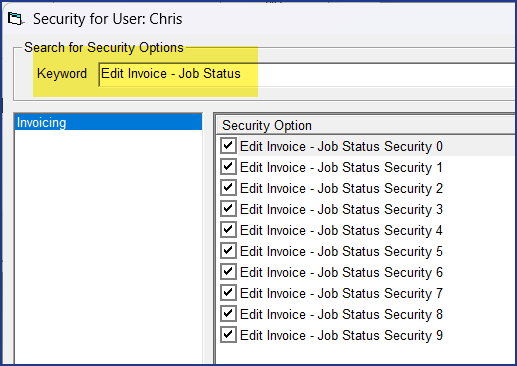
-
Assign the appropriate security options.
Available Security Options
The following security options are available:
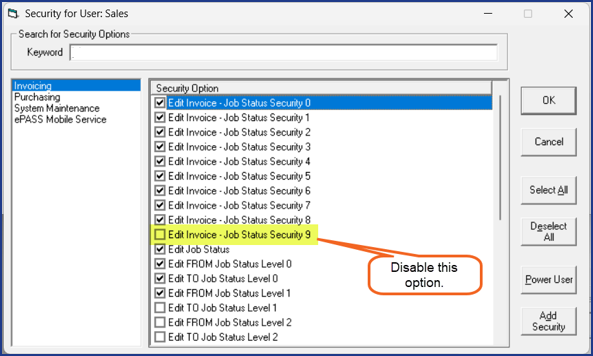
- Edit Invoice - Job Status Security 0
- Edit Invoice - Job Status Security 1
- Edit Invoice - Job Status Security 2
- Edit Invoice - Job Status Security 3
- Edit Invoice - Job Status Security 4
- Edit Invoice - Job Status Security 5
- Edit Invoice - Job Status Security 6
- Edit Invoice - Job Status Security 7
- Edit Invoice - Job Status Security 8
- Edit Invoice - Job Status Security 9
These permissions determine whether a user can edit invoices assigned to Job Statuses with the corresponding security level.
Applying Security Levels to a Job Status
-
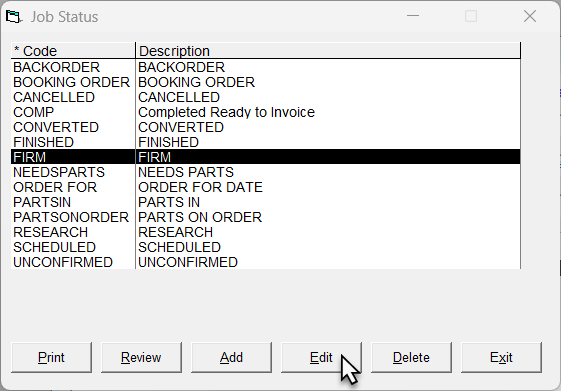
Go to Tools > System Maintenance > Tables > Job Status.
-
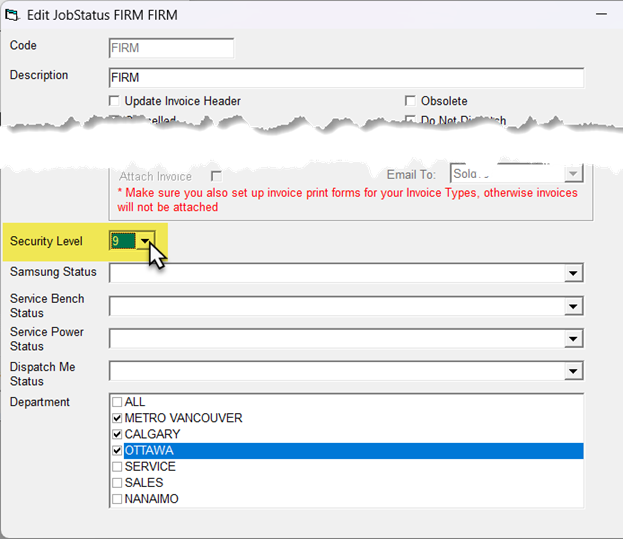
Select a Job Status and then click Edit.
-
Select a Security Level from the dropdown list.
-
Click OK.
-
Repeat steps 2–4 for additional Job Status codes.
Example Workflow
Scenario: Restrict Changes to Firm Invoices
-
Create or configure a Job Status called Firm.
-
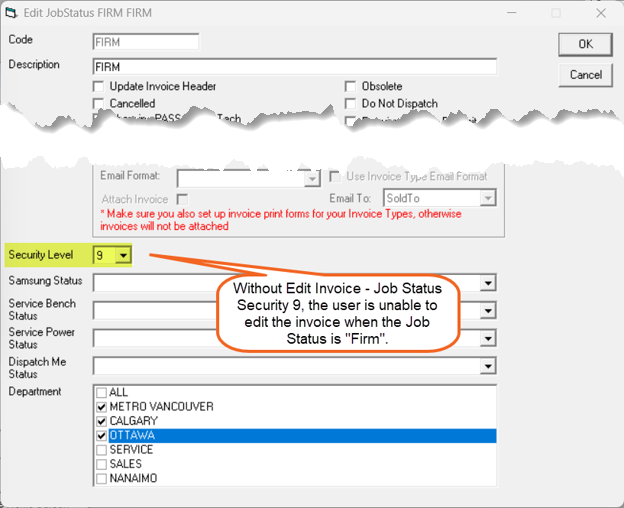
Assign the Job Status a high security level.
-
Disable Edit Invoice - Job Status Security 9 permissions for the “Sales” user security group.
-
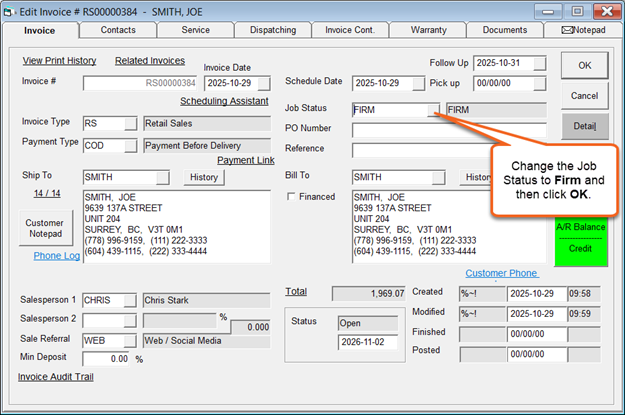
Select the Firm Job Status when invoice information has been finalized.
-
Users without the required permission can no longer modify the invoice.
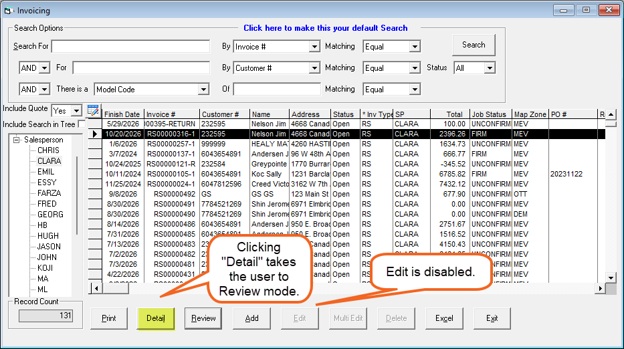
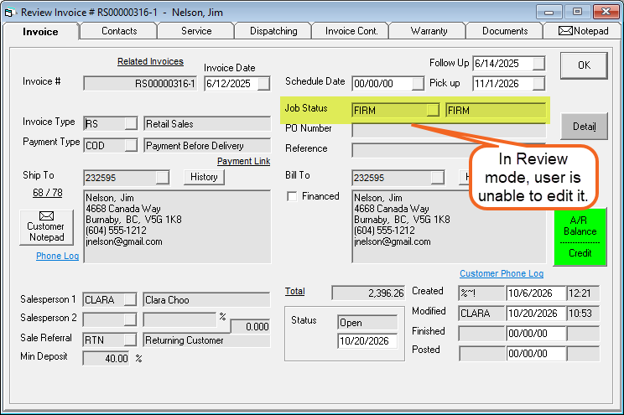
This process helps protect completed invoices from accidental or unauthorized modifications.
- This security controls invoice editing access based on the invoice's current Job Status Security Level.
- Existing Job Status security continues to control whether users can change the Job Status itself.
- Invoice Edit Security provides an additional layer of protection by controlling access to all invoice modifications.
- Security permissions can be assigned individually to users or through security groups, depending on company security practices.
- Users without sufficient permissions may still be able to view invoice information.