Update the PO and Reference for Multiple Invoices
You can edit the PO# and Reference information across multiple invoices at once using the Multi Edit Invoice feature. This helps reduce manual invoice maintenance by allowing you to apply the same PO Number and Reference Number to multiple invoices in a single operation.
To Update Multiple PO and Reference Numbers
-
Go to Invoicing > Maintenance.
-
Using the search options, locate the invoices that you want to update and select them.
-
Click Multi Edit Fields.
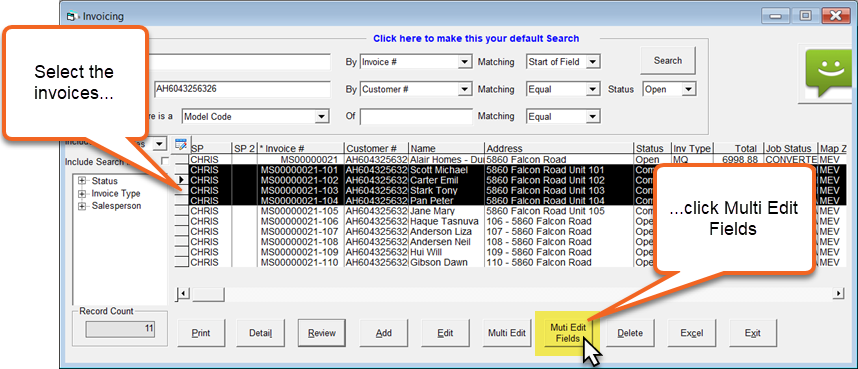
-
Click the Selected Invoices tab.
-
Enter the new PO# and the new Reference #.
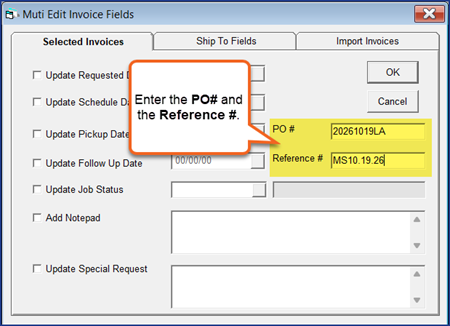
-
Click OK. When processing is complete, the status window displays a message for each invoice that was successfully updated.
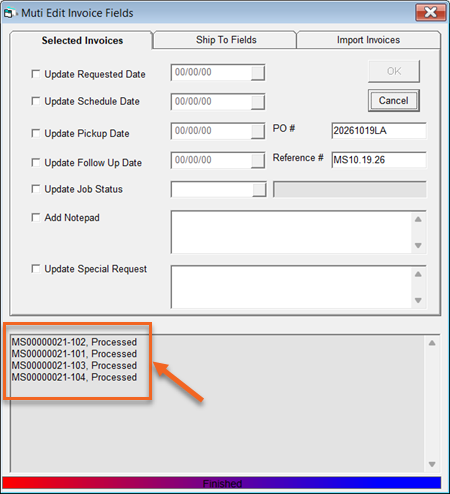
Notes:
- The PO Number and Reference Number entered in the Multi Edit screen are applied to all selected invoices.
- Existing values in the selected invoices will be replaced with the new values.
- You should verify invoice selections before clicking OK to avoid updating unintended records.
- Changes are applied immediately once processing is completed.