PO-19 Transfer Requests Report
This report lists all the transfer requests that were either manually or automatically created through the interstore transfer system and is also used to generate batch numbers for batch transfers.
To Run the Report
-
Go to Purchasing > Reports > PO-19 Transfer Requests Report.
-
Enter the report parameters and then click OK to run the report.
-
To generate a batch number for the transfers listed on the report, click Generate Batch & Print.

Parameters
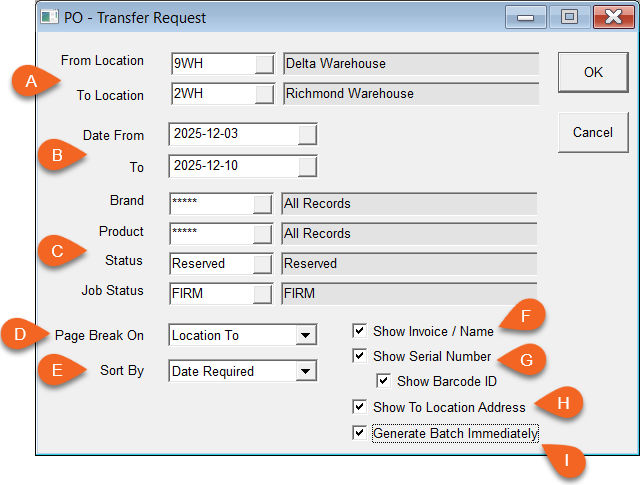
| A - From/To Location | Select the products current location and where it is transferring to. The report will print out a separate page for everything going from one location to another. |
| B - Date From/To | This looks at the date the transfer is required by. If you don’t do a transfer run every day, make sure you pull everything up to the next transfer day. |
| C - Brand/Product/Status/Job Status | Filter the report results by Brand, Product, Transfer Status, or Job Status. Transfer Status is defined in Tools > System Maintenance > Tables > Transfer Status. |
| D - Page Break On | Select when the report inserts a page break: on the Location To or Location From. |
| E - Sort By | Select how the report results are sorted: Model/Item, Brand/Model, Product/Model, Date Required, Bin (oldest Serial). |
| F - Show Invoice/Name | Selecting this option displays on the report the Invoice and customer name for each product that is being transferred, if applicable. |
| G - Show Serial Number/Show Barcode ID | Select Show Serial Number to print the product's serial number on the report (if applicable). Select Show Barcode ID to print the product's barcode image on the report below the serial number. |
| H - Show to Location Address | Selecting this option displays on the report the address of the location that each product is transferring to. |
| I - Generate Batch Immediately | Select this option to have EPASS generate the batch number and include it on the report immediately, without needing to click the Generate Batch & Print button. |
See Also
Updated
September 3, 2025